
Fleet mods
Small add-ons an agent writes for you that change what Fleet shows and, from Fleet 0.51.0, what you send, what an agent may ask, and which buttons and panes you get. Turn them on, try a sample, ask for one, and write one by hand.
What mods are
Section titled “What mods are”A mod is a small add-on that changes what Fleet shows. You don’t have to write one. You describe what you want, and an agent writes it for you.
A mod can draw on a tool’s row in the conversation: on the row’s line, and in the body you see when you open the row. From Fleet 0.51.0 it can also change a prompt before the agent gets it, queue a follow-up when a turn ends, and refuse an agent’s permission ask. Buttons in anything a mod draws work, a mod can open a pane of its own beside the conversation, and a mod can list a pane in the + menu. A band above the composer and a chip in the status bar are not available yet.
See what mods can do in the showcase, with a prompt for each.
Fleet’s mods follow Claude Code’s mods, and the names are the same where the idea is the same. They work with OpenCode, OpenCode 2 and Claude Code sessions.
Turn mods on
Section titled “Turn mods on”- Open Settings → Features.
- Turn on Mods. It is marked Experimental and is off by default.
Mods run in a small program that needs Bun. Fleet asks before it does anything:
- If Fleet finds a Bun on your computer, it says where. Choose Use my Bun to run mods on it. Nothing is downloaded.
- Otherwise, choose Turn on and install, or Download Fleet’s own if it found a Bun but you’d rather not use it. Fleet downloads Bun, checks it against a checksum built into Fleet and shows a progress bar. Nothing else on your computer changes.

With Mods off, nothing changes. No mod program runs and no Bun is downloaded.
Try a sample
Section titled “Try a sample”Fleet comes with twelve sample mods. From Fleet 0.52.0 they’re in the Showcase under Settings → Mods, grouped by what they change: tool rows; prompts, turns and permission asks; buttons and panes. Each one says what it does and where to try it. Choose Add and it’s kept like any mod you keep, with its switch in the list above. Once Mods are on, Settings → Features links to the Showcase too.
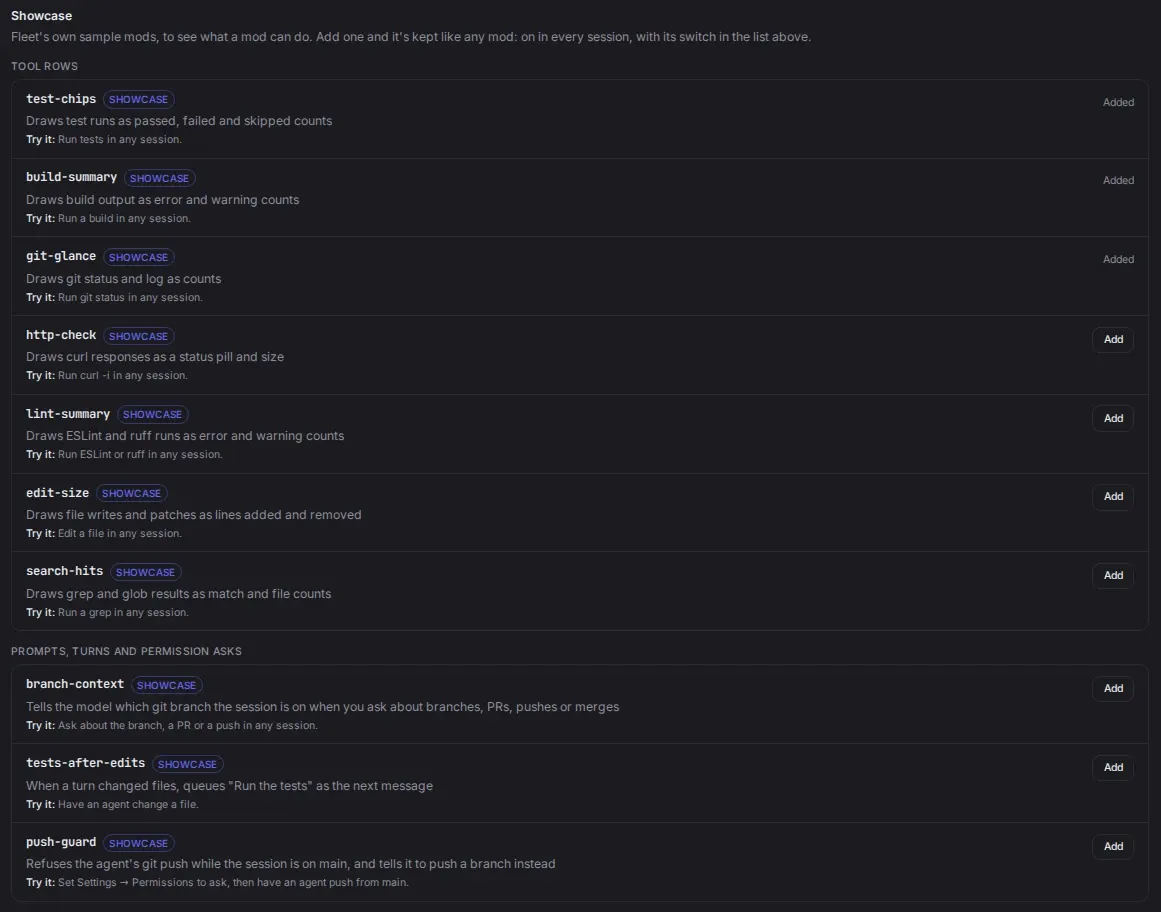
In Fleet 0.50.0 and 0.51.0 the samples are links under the Mods switch in Settings → Features instead: Try the test-chips sample, Try build-summary and so on. 0.50.0 has only test-chips.
To start with test-chips, add it, then ask an agent to run your tests in any session. The tool’s row shows how many tests passed, failed and were skipped. Open the row and the failing test names come first, then the full output.
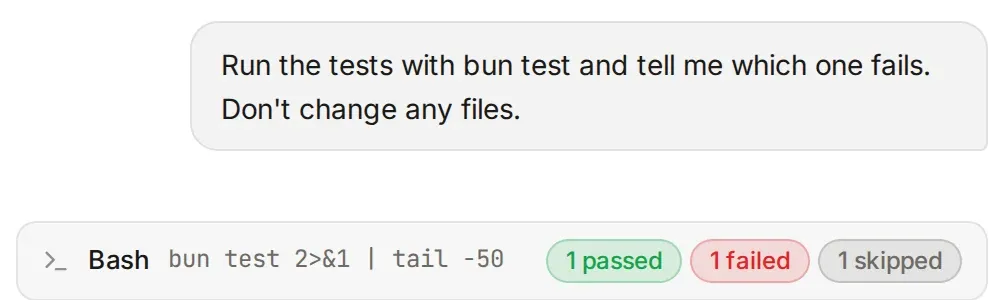
It reads dotnet test, bun test, vitest, pytest and go test.
Ask an agent for a mod
Section titled “Ask an agent for a mod”Describe what you want in a session. For example: “Show how many lines a command printed on its row.” The agent writes a draft.
- A draft runs only in that session, wherever the session is open: desktop, phone or another tab. What it draws is marked Draft.
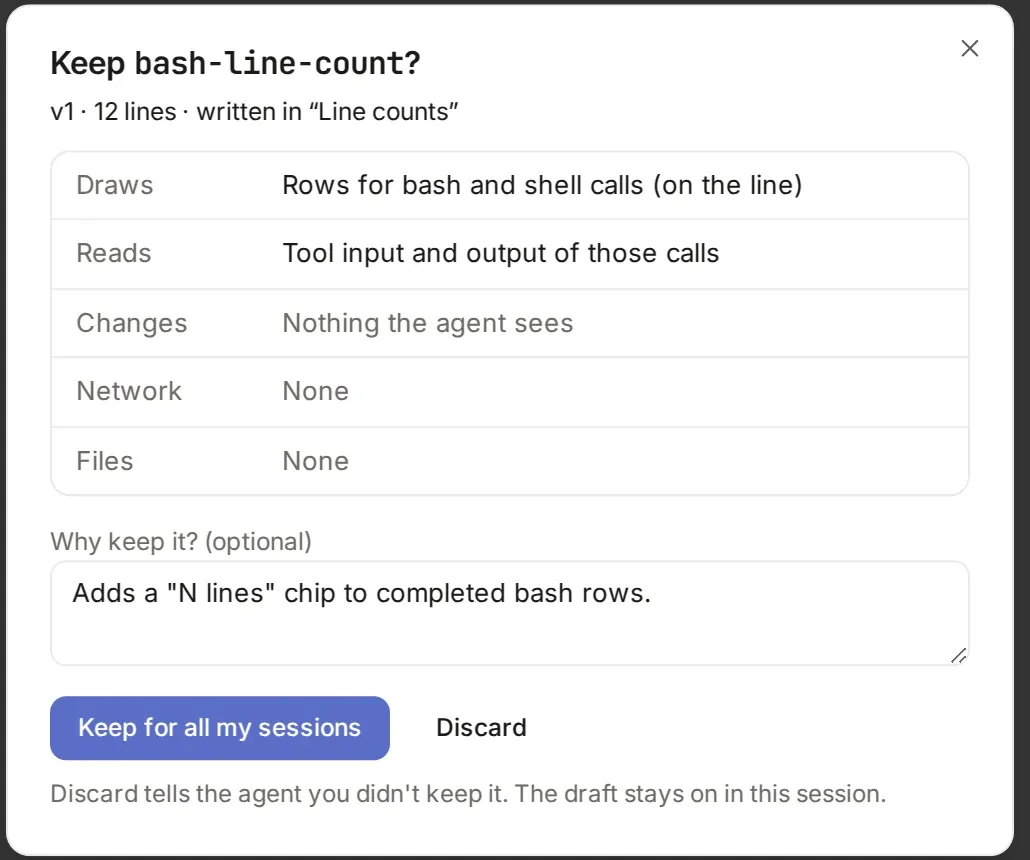
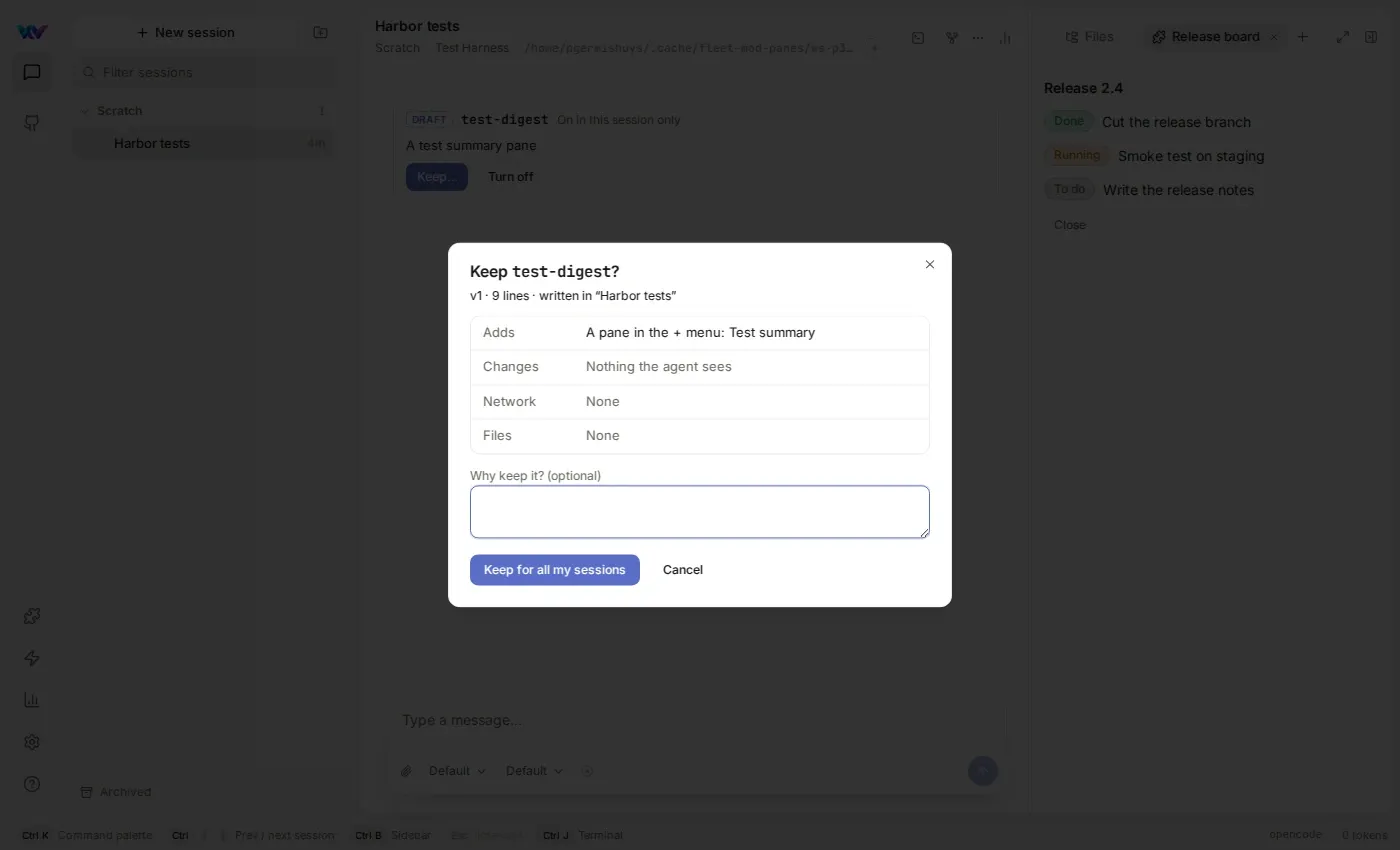
- When the agent asks you to keep it, Fleet shows what the mod touches: what it draws, what it reads, and whether it uses the network or files.
- Choose Keep for all my sessions to make it a version (
v1, thenv2, and so on) that runs in all your sessions on this machine. Choose Discard to tell the agent you didn’t keep it. The draft stays on in that session.
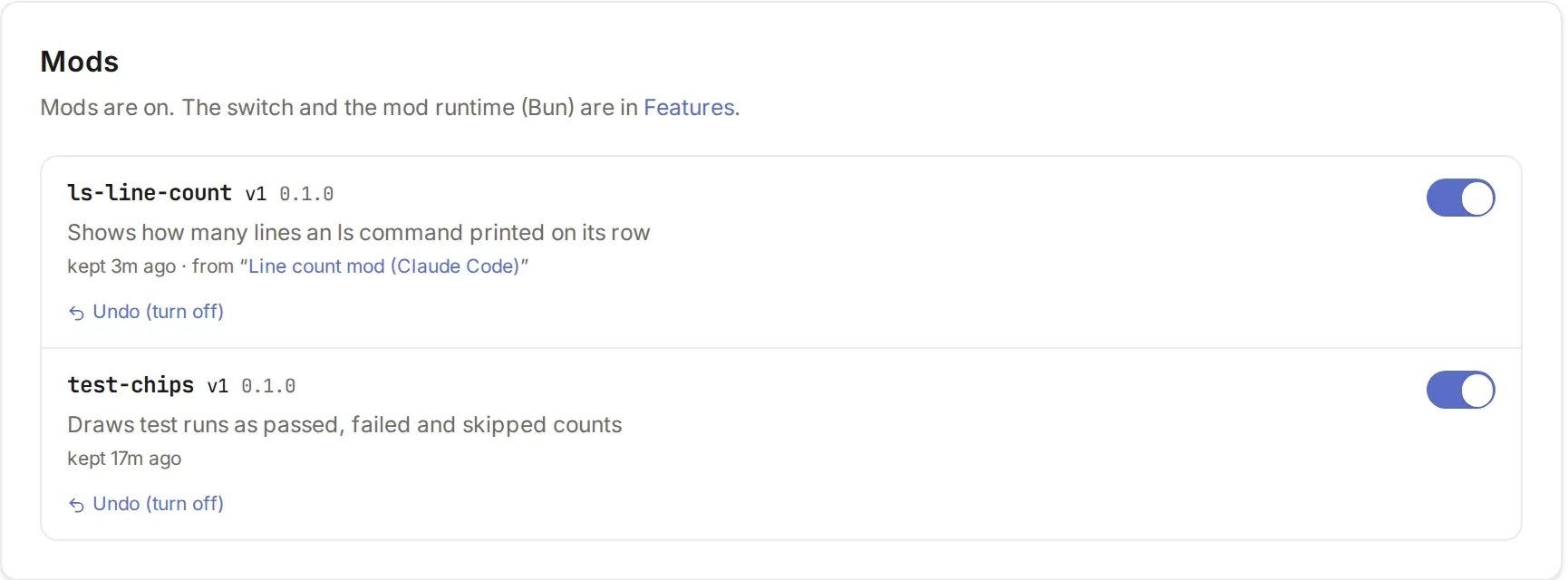
Settings → Mods lists the mods you kept. Each has a version, an on/off switch and Undo. Undo goes back one version, or turns the mod off if it is on v1. Nothing is deleted.
Prompt, turn and permission hooks
Section titled “Prompt, turn and permission hooks”Three hooks let a mod do more than draw. All three work with OpenCode, OpenCode 2 and Claude Code, except where noted. They never reach files, processes or the network.
Change a prompt
Section titled “Change a prompt”The prompt.submit hook sees what you sent before the agent gets it. A mod can do one of two things:
- Reword it. The new text is what the conversation shows in your bubble and what the agent receives, and the bubble is marked Rewritten by the mod’s name.
- Add context only the model reads. The note isn’t in your bubble. OpenCode, OpenCode 2 and Claude Code take it. Pi doesn’t, so Pi sessions get none. Added context is capped at 8 KiB in total.
A mod can also read the session’s git branch with $.session.branch(). It is null outside a git repository or on a detached HEAD.
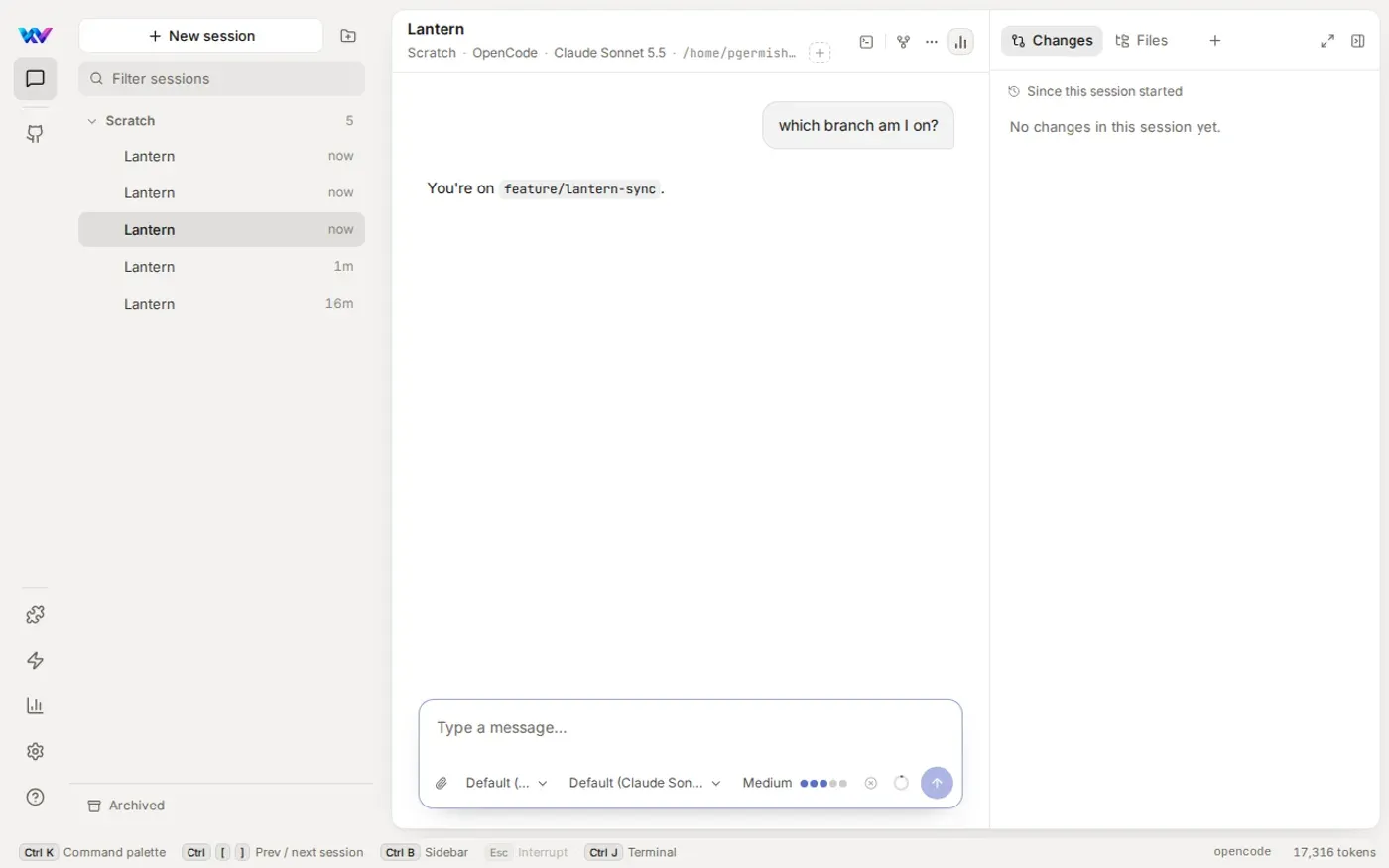
The branch-context sample adds the branch as a note when a prompt mentions branches, PRs, pushing or merging. Here the user typed only “which branch am I on?”, and the agent answered from the note without running a command.
Limits:
- It fails open. If no mod hooks it, the host isn’t running, a hook throws or fails to answer in time, or the answer isn’t usable, your prompt goes on exactly as you typed it, with no context. Fleet waits at most 2 seconds, and a hook has 1.5 seconds of its own.
- Slash commands (
/compact, a skill, a command) are not sent through it. Every other prompt is, including a new session’s first message and prompts from automations. - A mod can’t drop or block a prompt yet.
Follow up when a turn ends
Section titled “Follow up when a turn ends”The turn.complete hook fires when a turn ends, whether it finished, you stopped it or it failed. Its event says which (isAborted, isFailed) and lists changedFiles: the files the agent’s edit, write and patch calls finished since the last turn ended. OpenCode and OpenCode 2 report them. Claude Code and Pi always send an empty list, and edits made by a shell command such as sed are not seen. Side conversations (/btw) and the child sessions an agent delegates to don’t fire it.
A hook can call $.prompt.submit({ text }) to queue a message in the session. It joins the same queue your own messages wait in, so it shows in the queue list and is sent next, behind anything you had already queued.
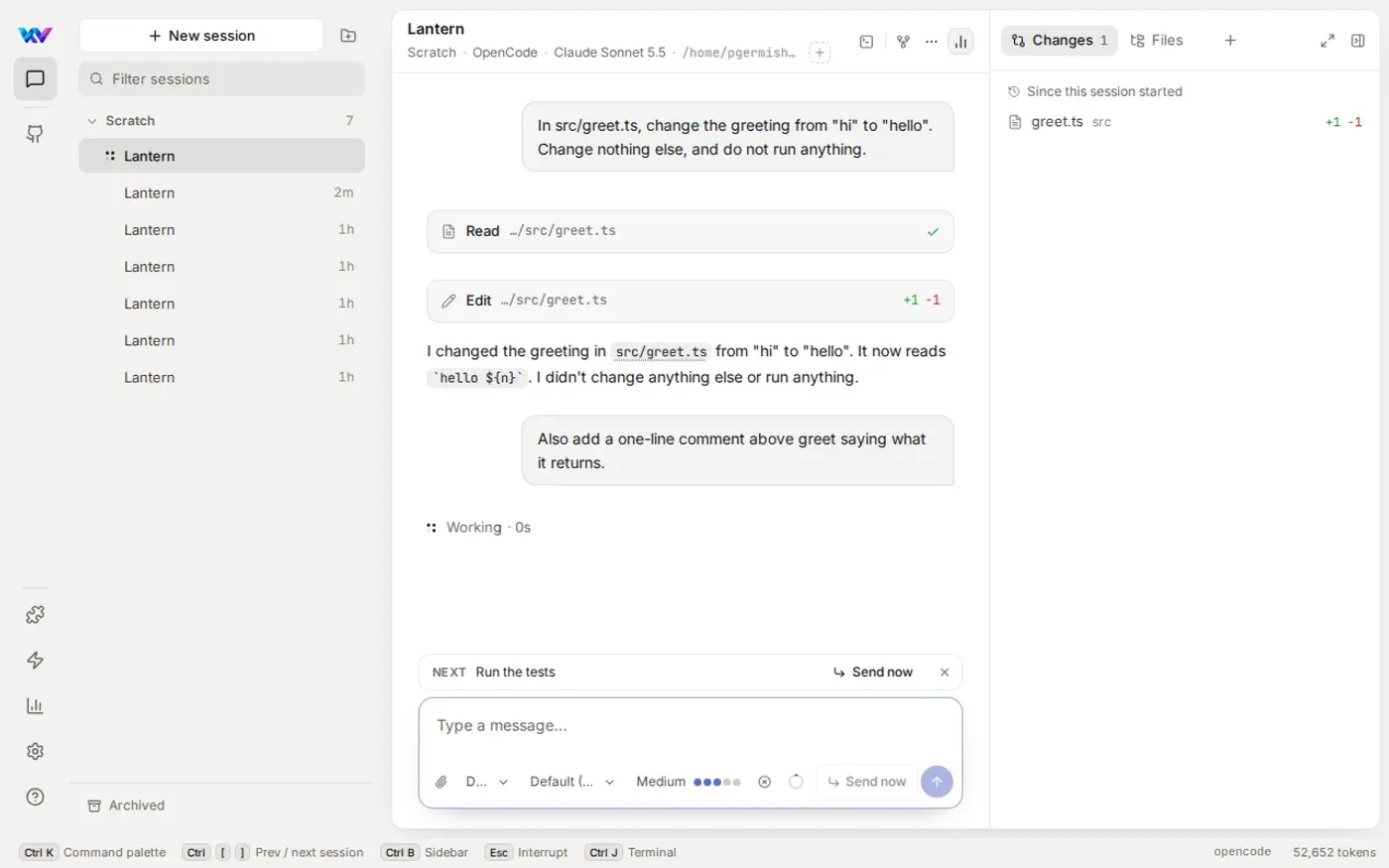
The tests-after-edits sample queues “Run the tests” when a turn changed files and wasn’t stopped or failed. A turn that changed no files queues nothing. Below, the user had queued a message of their own, so the mod’s “Run the tests” waits in the queue as Next.
Limits:
- A mod can queue 3 follow-ups in a row in a session. The 4th is refused until you send or queue a message in that session. Fleet keeps the count in memory, so a restart starts it again.
- Fleet waits at most 2 seconds for the hooks, then goes on with the queue. When a message a mod queued is sent, its bubble is marked Sent by the mod’s name.
turn.completeis watch only.agent,model,usageandcostare in the types but Fleet doesn’t send them yet.
Refuse a permission ask
Section titled “Refuse a permission ask”The permission.ask hook sees an agent’s ask before you do. A mod can deny it with a reason, and then you get no card and no Needs-you. Fleet answers the ask for you with the message <mod name>: <reason>, so the agent is told who refused and why. OpenCode and Claude Code show that as the tool call’s error. OpenCode 2 is sent the message but its server drops it, so the agent sees a plain rejection there. A reason is up to 500 characters.
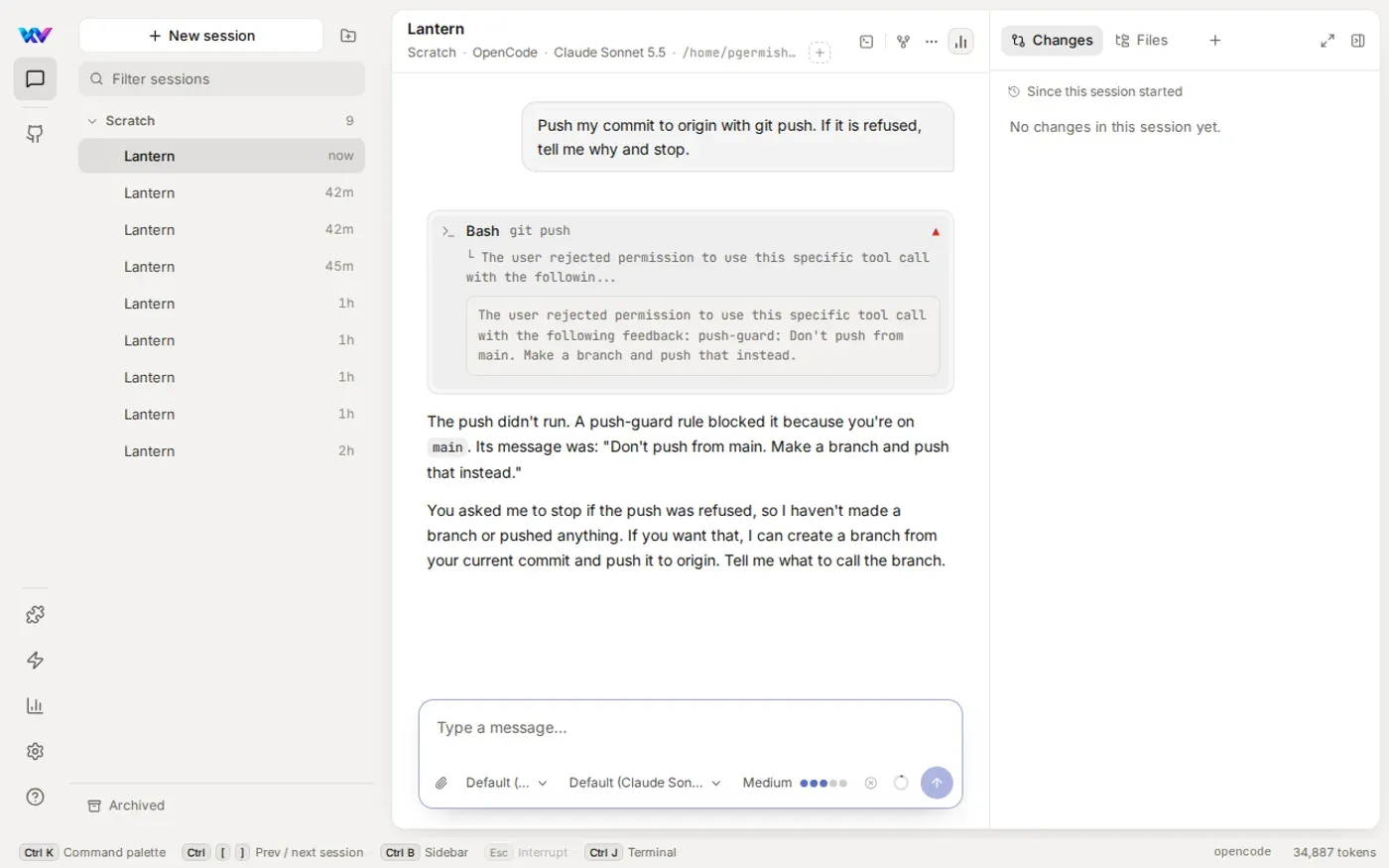
The push-guard sample denies git push while the session is on main, with the reason “Don’t push from main. Make a branch and push that instead.”
Limits:
- A mod only sees asks that would reach you. If Settings → Permissions is set to allow shell commands, they are never asked, so push-guard never sees them. Set it to ask for shell commands (
askoredits) to use it. - A mod can deny or pass. It can’t allow an ask for you yet.
- It fails open: if no mod hooks it, the host isn’t running, a hook fails or takes more than 2 seconds, the ask goes to you as normal.
- Pi has no asks. A subagent’s ask is sent on the parent session, where you’d see its card.
Buttons
Section titled “Buttons”From 0.51.0 a Button, Input or Select in anything a mod draws reaches the mod: on a tool row, in a pane, anywhere. Press the button and Fleet runs the mod’s callback in the mod’s program. If the callback writes $.state, Fleet draws that place again, with no page load.
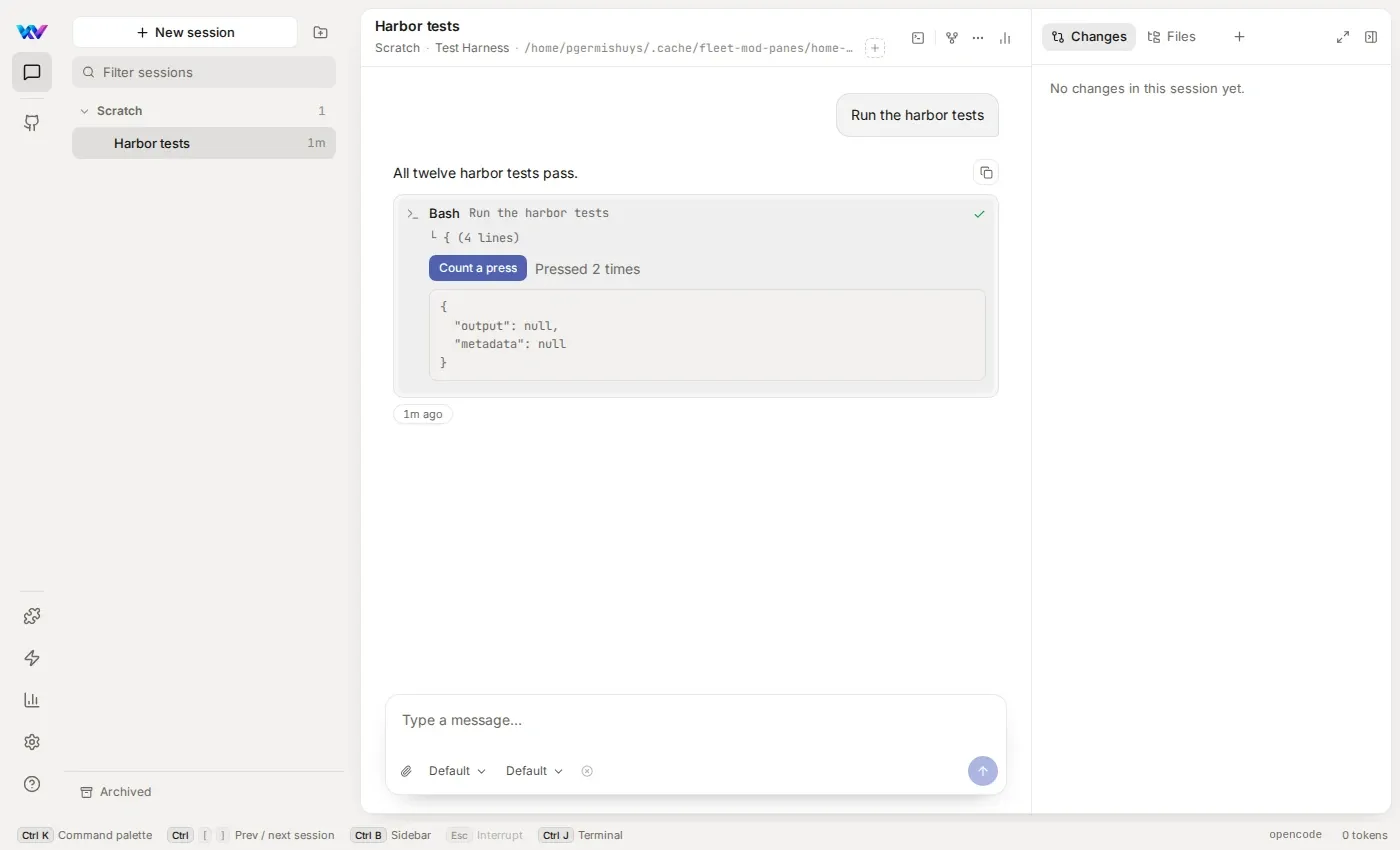
The press-counter sample puts a Count a press button and a count in the opened body of a shell row. Below it has been pressed twice.
Limits:
- A button’s callback runs in the mod. If the mod has stopped or reloaded since the row was drawn, the press is not handled and Fleet draws the row again so you get a fresh button. A callback that throws counts as a failure of the mod, like any hook.
- An
Inputsends at most 4 changes a second, the last value kept.
A pane is a tab a mod draws in a session’s content panel, next to Changes and Files. A mod gets one two ways.
A mod opens its own
Section titled “A mod opens its own”A callback calls $.ui.open({ id, title }), usually from a button. Fleet opens the tab (and the panel if it was closed), brings it forward, and asks the mod’s Pane hook to draw it. $.ui.close({ id }) closes it. Opening the same id again draws it in place.
The release-board sample adds an Open board button to a shell row. Pressing it opens a Release board tab, drawn by the mod, with a Close button that closes it.
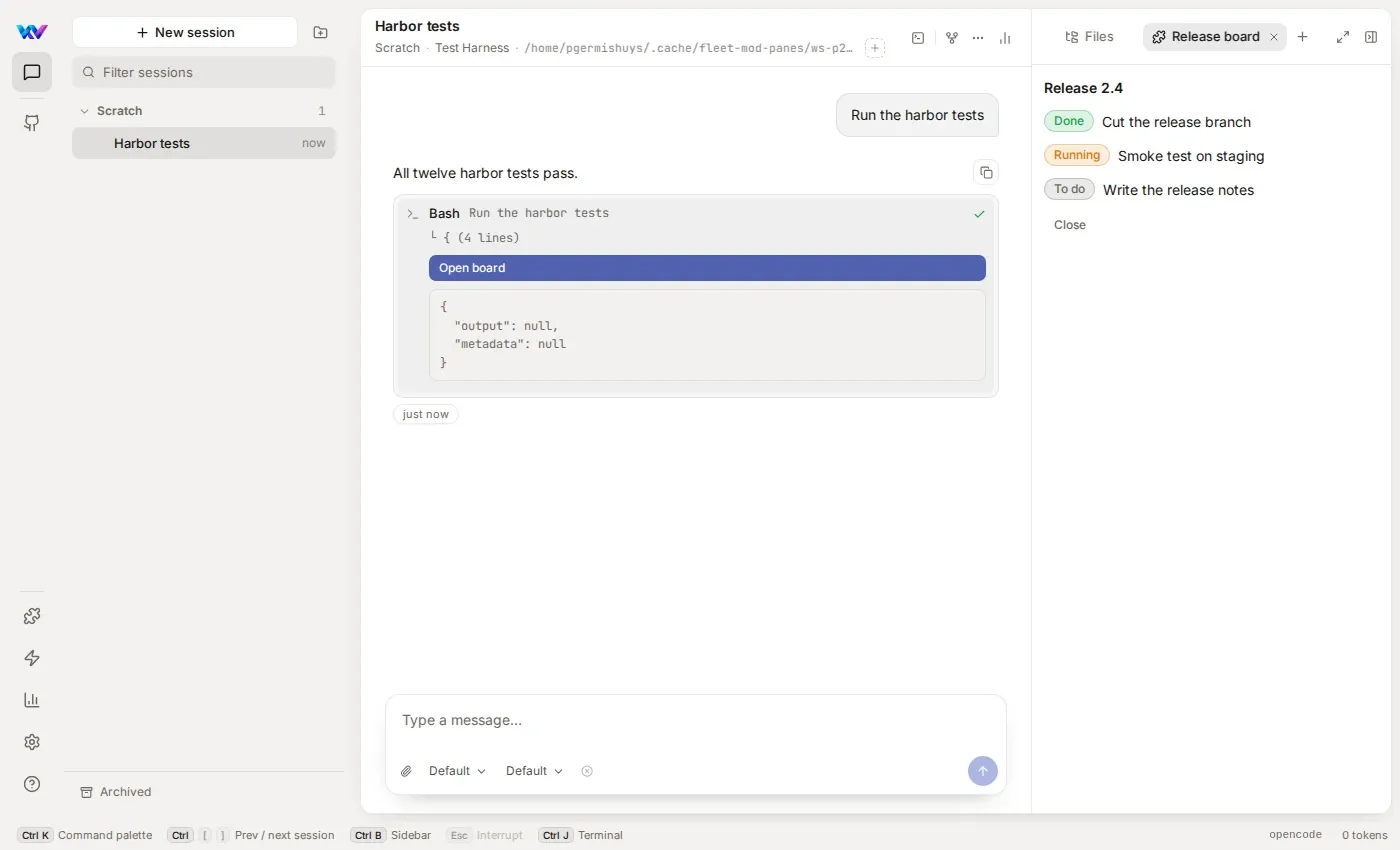
A pane is a full tree. Buttons, inputs and $.state work in it like anywhere else.
A mod lists it in the + menu
Section titled “A mod lists it in the + menu”A mod can also declare panes in mod.json. You open them from the + menu in the content panel, under From mods: the pane’s icon and title, and the mod’s name as the hint (Open while its tab is open). Picking one opens the tab and the mod draws it. The phone’s session menu lists them too, and the pane opens in a sheet.
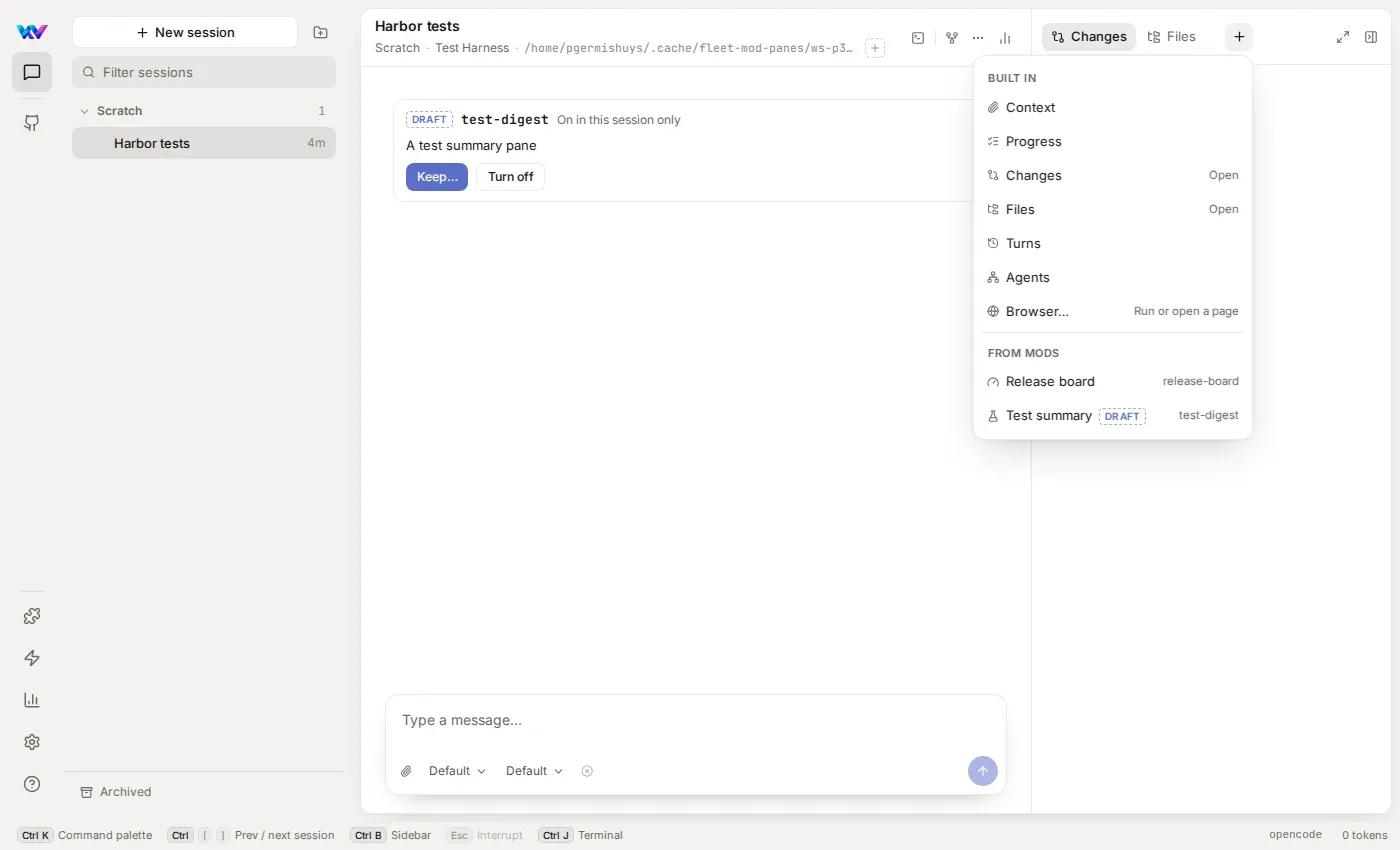
- A draft’s pane has a Draft mark and is listed only in the session that wrote it.
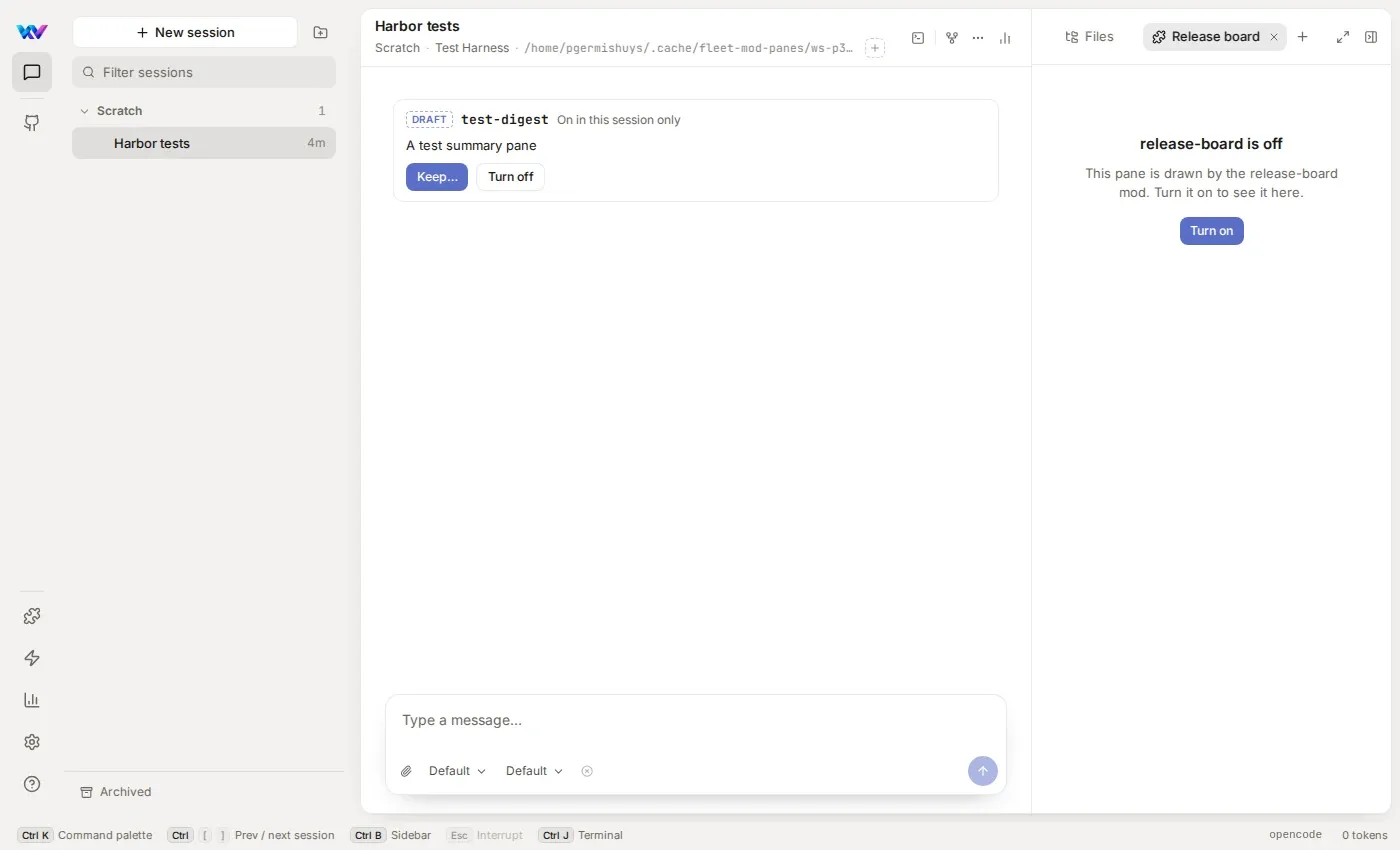
- When a mod is off, its panes stay in the menu with an Off hint. Its open tab says the mod is off and has a Turn on button, the same switch as Settings → Mods. Turn it on and the pane draws again.
- The review before you keep a mod has an Adds row: “A pane in the + menu” and the pane titles.
Limits:
- Pane tabs don’t come back after you reload the page. Open them again from the + menu.
- A
$.ui.opensent while no browser has the session open is lost. It is not replayed when you open the session later. - Open and close panes from a button or an event, not while drawing. A
ui.renderhook that calls$.ui.openor$.ui.closethrows. A$.ui.openinsession.startruns again every time the mod host restarts, so open from a user’s press instead. - A mod can open a pane it never declared. It draws the same way but isn’t in the menu.
- A pane’s id belongs to its mod: only the opening mod’s
Panehooks draw it, and two mods may use the same id.
Safety
Section titled “Safety”A mod can compute and draw. In Fleet 0.50.0 that is all it can do. From 0.51.0 a mod can also reword your prompts, add context for the model, queue follow-up messages, refuse an agent’s permission asks, run a callback when you press its button and open a pane, so read the review before you keep one that hooks them. A mod still can’t:
- read or write files
- start processes
- use the network
- answer a permission ask for you (it can only deny, or pass)
Fleet draws everything a mod returns with its own components, in its own theme. A mod never runs script in Fleet’s page. The review before Keep lists every call the mod makes.
Mods are not a sandbox. They run in one program beside Fleet, as you, so keep only mods you’ve read the review for.
If a mod breaks Fleet:
- Start without mods. Add
?mods=offto any Fleet address, or use the menu item. Mods stay stopped until Fleet restarts or you choose Turn mods back on. It only affects your own mods. - Three strikes. If a mod fails three times in a row, Fleet turns it off. The error shows in Settings → Mods. A draft is turned off in its session until the agent reloads it.
- Undo works even on a mod that was turned off by strikes.
Write one by hand
Section titled “Write one by hand”You can ask an agent and never read this section. If you’d rather write a mod yourself, here is the short version. The full contract is docs/mods/api.md in the Fleet repository, and the types are in mods/types/fleet-mods.d.ts.
A mod is a folder with two files.
{ "name": "test-chips", "version": "0.1.0", "description": "Draws test runs as passed, failed and skipped counts", "hooks": "./mod.ts"}The name is lowercase letters, digits and -, and matches the folder. A mod that offers panes adds "panes": [{ "id": "board", "title": "Release board", "icon": "gauge" }] (up to 8; id is letters, digits, _ and -; title is 1 to 40 characters; icon is one of the Icon names). The module exports register. It can import type from fleet-mods and nothing else.
import type { Register } from "fleet-mods";
export const register: Register = (on) => {  on("ui.render", { component: "ToolUse", props: { tool: "bash" } }, async ($, e, next) => {    // observe:  return next(e)    // answer:   return a tree (or null) without calling next    return next(e);  });};
on(event, matcher, hook)registers a hook. Call it insideregister, with a string event and an object matcher.- A hook is
($, e, next). It can pass the event on withnext(e), change it withnext({ ...e, ... }), or answer with a tree. $is the only way out. Call it in full, like$.ui.resolve(e).
Events
Section titled “Events”| Event | Fires when | Needs |
|---|---|---|
session.start |
A mod’s first event in a session, and again after the mod reloads | 0.50.0 |
ui.render |
Fleet is about to draw a tool row the mod hooked | 0.50.0 |
prompt.submit |
You sent a prompt, before the agent gets it. A mod can reword it or add context for the model | 0.51.0 |
turn.complete |
A turn ended: finished, stopped or failed. Watch only, but a hook can queue a follow-up with $.prompt.submit |
0.51.0 |
permission.ask |
An agent asked for something you’d have to answer, before you see it. A mod can deny it with a reason | 0.51.0 |
ui.press |
A Button the mod drew is pressed. A hook can pass it on, or swallow it |
0.51.0 |
ui.input |
An Input changes or is submitted |
0.51.0 |
ui.select |
A Select changes |
0.51.0 |
Places
Section titled “Places”| Place | Where it draws | Needs |
|---|---|---|
ToolUse |
On a tool row’s line. Inline elements only | 0.50.0 |
ToolResult |
The body a tool row shows when opened | 0.50.0 |
ComposerBand |
A band above the composer | Not yet |
StatusChip |
A chip in the status bar. Inline elements only | Not yet |
Pane |
A pane the mod opened with $.ui.open or declared in mod.json. Tell panes apart by e.requestId, the pane’s id |
0.51.0 |
Inline elements are Text, Pill, Icon, Button and a row Box holding only those.
What $ has
Section titled “What $ has”$.mod, $.ui (resolve, invalidate, log, and open and close from 0.51.0), $.state, $.store, $.session (including branch() from 0.51.0), $.prompt (submit, from 0.51.0) and $.clock. $.ui.open and $.ui.close open and close a pane. $.ui.toast and $.session.surfaces() are in the contract but don’t do anything yet. There is no file, process or network access, and no setTimeout: use $.clock.
Elements
Section titled “Elements”Box, Text, Pill, Icon, Button, Input, Select, Markdown, Code and Page. Colours are roles (text, muted, accent, good, warn, bad), not hex values, so a mod follows the theme. Every Button, Input, Select and Page needs a unique key.
Worked example: test-chips
Section titled “Worked example: test-chips”This is test-chips cut down to one runner. It lives in full in the Fleet repository at mods/samples/test-chips/.
import type { Register } from "fleet-mods";
const TEST_COMMAND = /\b(bun (run )?test|vitest|pytest|go test)\b/;
// bun test prints " 12 pass", " 2 fail" and " 1 skip" on their own lines.function parse(output: string) {  const pass = /^\s*(\d+) pass\s*$/m.exec(output);  const fail = /^\s*(\d+) fail\s*$/m.exec(output);  if (!pass && !fail) return undefined;  const skip = /^\s*(\d+) skip\s*$/m.exec(output);  const failing = [...output.matchAll(/^\(fail\)\s+(.+?)\s*$/gm)].map((m) => m[1]);  return { passed: Number(pass?.[1] ?? 0), failed: Number(fail?.[1] ?? 0), skipped: Number(skip?.[1] ?? 0), failing };}
export const register: Register = (on) => {  on("ui.render", { component: ["ToolUse", "ToolResult"], props: { tool: ["bash", "shell"] } }, async ($, e, next) => {    if (e.component !== "ToolUse" && e.component !== "ToolResult") return next(e);    if (!TEST_COMMAND.test(String(e.props.input.command ?? ""))) return next(e);    const counts = parse(e.props.output);    if (!counts) return next(e);
    const { Box, Text, Pill } = $.ui.resolve(e);    const pills = Box({      flexDirection: "row",      gap: 1,      children: [        Pill({ tone: "good", label: `${counts.passed} passed` }),        counts.failed > 0 && Pill({ tone: "bad", label: `${counts.failed} failed` }),        counts.skipped > 0 && Pill({ tone: "neutral", label: `${counts.skipped} skipped` }),      ],    });    if (e.component === "ToolUse") return pills;
    // Opened: the failing names, then Fleet's own output under them.    return Box({      flexDirection: "column",      gap: 2,      children: [        ...counts.failing.map((name) => Text({ code: true, color: "bad", children: [name] })),        await next(e),      ],    });  });};
The hook runs for bash and shell rows, skips anything that isn’t a test command, and draws chips on the row. When the row is opened it draws the failing names and then await next(e), which is Fleet’s own output.
A mod that reads something it shouldn’t, or draws something Fleet doesn’t know, doesn’t load or draws nothing, and counts a strike. The mod’s log in Settings → Mods says why.
What’s next
Section titled “What’s next”Still not available: a band above the composer, a chip in the status bar, toasts ($.ui.toast), $.session.surfaces(), slash commands a mod adds, dropping a prompt, pane tabs coming back after a reload, and allow for permission asks. Mods that read files, run processes or use the network are planned, and the review before you keep a mod will show what it touches.
Questions or something that doesn’t work? Open an issue in the Fleet repository.